
Cut Splunk
License By Half
Optimize at the edge to cut costs 50%.Stream from S3 on-demand to reach 80%+
Reduce Spend
Deploy 10x apps to lower licensing, network, and infrastructure costs.

Dev
Preview savings

Splunk
Pinpoint waste

Edge
Optimize at source

Storage
Ingest on-demand


Simple Pricing
One question: How many nodes run log collection?
| Tier | Nodes | Annual Price |
|---|---|---|
| Starter | up to 50 | $15,000 |
| Growth | up to 300 | $35,000 |
| Business | up to 750 | $65,000 |
| Enterprise | up to 1,500 | $105,000 |
| Enterprise+ | 1,500+ | Contact us |
All tiers include unlimited log volume, all products, and all features. See all tiers →
Splunk Integration
Open-source Splunk app for transparent search-time expansion.
Zero changes to queries, dashboards, or alerts
Zero Changes
Full Compatibility
Splunk App
Frequently Asked Questions
Getting Started
- Dev — Run on your Splunk log files locally. One-line install, results in minutes. No account, no credit card.
- Cloud Reporter — Connect to your Splunk instance via REST API. See which event types cost the most — no agent changes.
- Edge apps — Deploy optimizer and regulator via Helm chart alongside your forwarder. ~30 min setup.
- Storage Streamer — Route events to S3, stream selected data to Splunk on-demand.
Each step is independent — start with Dev to see your reduction ratio, then move to production when ready.
Yes. Log10x preserves all Splunk field mappings and metadata.
Functionality preserved:
- Saved searches work identically
- Dashboards and alerts require zero changes
- SPL queries return same results
- Report scheduling unchanged
How optimization works: Log10x uses template-based deduplication, not field removal. Repeated log events are compacted via references to templates while maintaining full searchability in Splunk.
~1.25x search time. The open-source 10x for Splunk app expands compact events at search time using native SPL and KV Store template lookups — no Python in the per-event hot path.
A search that takes 10 seconds on standard events takes ~12.5 seconds on compacted events. Per-event expansion is O(1) via KV Store lookups — the same mechanism Splunk uses for its own transforms.
Compatibility:
| Feature | Status |
| Interactive search (SPL) | ✓ Transparent expansion |
| Scheduled searches | ✓ Transparent expansion |
| Alerts | ✓ Transparent expansion |
| Dashboards & reports | ✓ Transparent expansion |
| REST API (search/jobs) | ✓ Transparent expansion |
| Summary indexing | ✓ Transparent expansion |
The Edge Optimizer losslessly compacts events at the forwarder before they ship to Splunk. From there, three paths:
1. Stream raw to S3 — The Storage Streamer sends events to Splunk on demand. S3 storage costs ~90–95% less per GB than Splunk indexing.
2. Stream optimized to S3 — 50–60% smaller footprint. The Storage Streamer expands events before sending to Splunk. Zero search-time overhead.
3. Index optimized in Splunk — Send optimized events directly to Splunk. The 10x for Splunk app expands at search time (~1.25x overhead). The tradeoff: 50–60% less Splunk license and ingestion cost, and for on-prem deployments, 50–60% less indexer hardware and storage. Optionally store a copy in S3 for long-term retention.
Paths can be combined — for example, index optimized in Splunk for hot data while storing optimized events in S3 for long-term search.
Yes. Log10x Edge apps deploy as sidecars to Universal Forwarders.
- Kubernetes: DaemonSet alongside UF, logs optimized and forwarded to Splunk HEC
- VM: Local process alongside UF, reads from forwarder output, optimizes and forwards to HEC
Compatibility: Universal Forwarder 8.x, 9.x. No changes to UF configuration required. Works with existing HEC endpoints and token authentication.
Log10x products work identically on both platforms:
- Edge apps (Reporter, Regulator, Optimizer) run as forwarder sidecars in your infrastructure — they don't touch Splunk's indexing tier
- 10x for Splunk app installs on both Cloud (via Splunkbase) and Enterprise
- Storage Streamer streams from S3 to both via HEC
Unlike Splunk's own Federated Search for S3 (Cloud on AWS only), Storage Streamer works with both Cloud and Enterprise, on any cloud or on-prem.
All 10x apps deploy in your infrastructure — no data leaves your network. Most teams adopt in three steps:
-
Cloud Reporter — samples your Splunk REST API to pinpoint which apps and source types cost the most. Runs as a Helm CronJobCloud Reporter — Helm CronJob:
log10xLicense: "YOUR-LICENSE-KEY"

jobs:
  - name: reporter-job
    runtimeName: my-cloud-reporter
    schedule: "*/10 * * * *"
    args:
      - "@apps/cloud/reporter"
Full deploy guide → in your cluster. -
Edge Optimizer — losslessly compacts logs at the source before they ship to Splunk. Add a tenx blockEdge Optimizer — Helm values:
tenx:
  enabled: true
  apiKey: "YOUR-LICENSE-KEY"
  kind: "optimize"
  runtimeName: my-edge-optimizer
Fluent Bit · Fluentd · Filebeat · OTel Collector · Logstash · Splunk UF · Datadog AgentFull deploy guide → to your existing forwarder Helm values; CLI or Docker for VMs. -
Storage Streamer — stores logs in S3 and streams selected events back to Splunk on demand. Deploy via a Terraform moduleStorage Streamer — Terraform:
module "tenx_streamer" {
  source       = "log-10x/tenx-streamer/aws"
  tenx_api_key = var.tenx_api_key

  tenx_streamer_index_source_bucket_name = "my-app-logs"
}
Full deploy guide → that provisions S3 buckets, SQS queues, and IAM roles.
Cost & Savings
Yes. Storage Streamer indexes your logs in S3 and streams matching events to Splunk when you need them — for incidents, scheduled dashboards, compliance audits, or metric aggregation.
Query workflow: Send a REST API call with a time range and search expression. The Bloom filter index identifies matching S3 files in <1 second. Matching events stream to Splunk via HEC with original timestamps — they appear in Splunk Search alongside your live data. ~100 events in 2-5 seconds, ~10K events in 10-30 seconds.
No separate UI to learn — results are standard Splunk events. Search, filter, and dashboard them with SPL the same way you always do. For recurring workflows, schedule queries via Kubernetes CronJob.
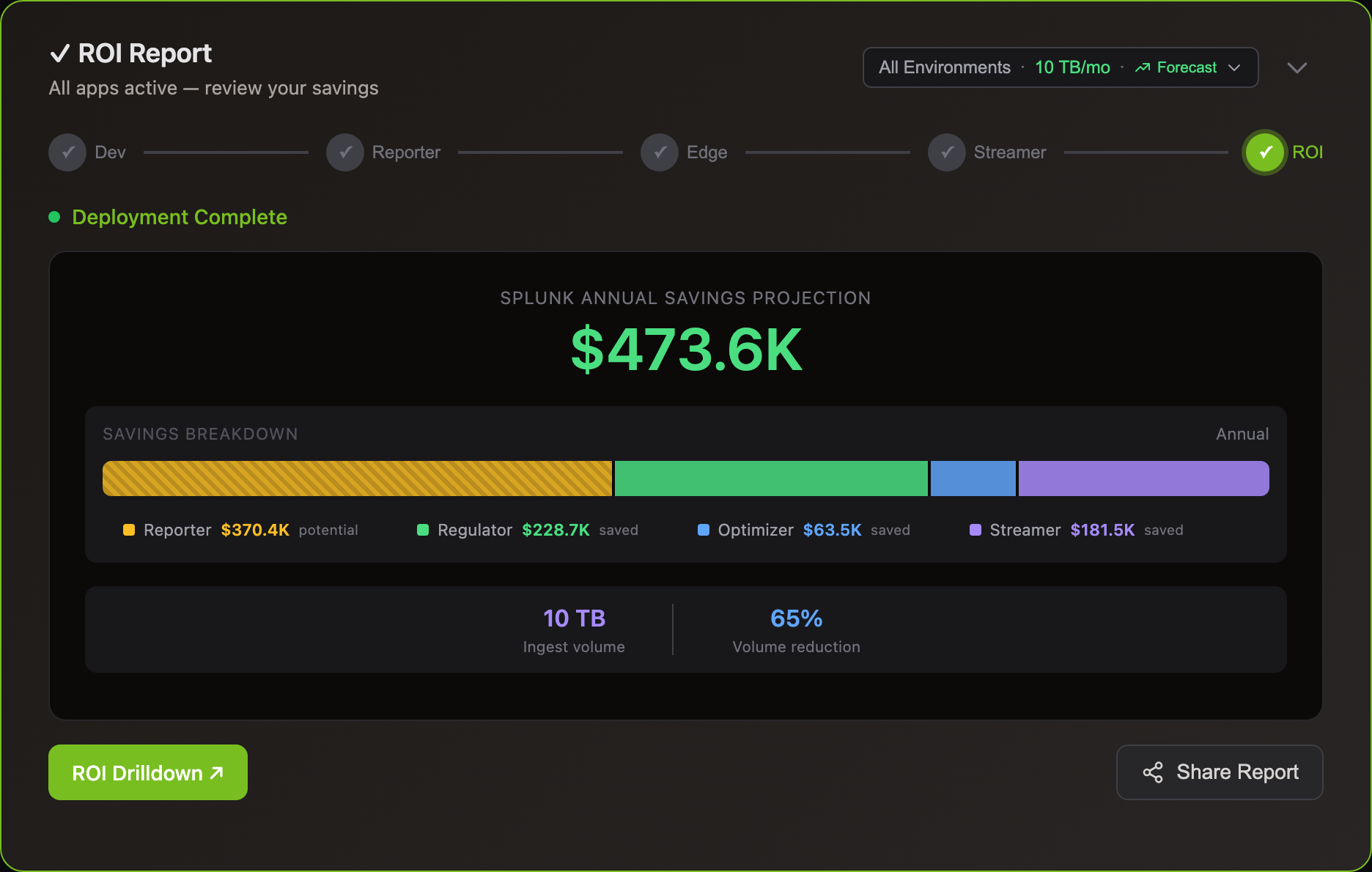
Most customers divert 75-80% of volume to S3. A 5 TB/day Splunk environment saves ~$2M/yr.
Yes, 30-60% volume reduction can move you to lower license tiers.
Example: 550 GB/day paying for 500 GB tier + overage penalties → 320 GB/day after Log10x → drops to lower tier. Result: $110K+ annual savings.
Deploy Log10x 2-3 months before renewal to demonstrate sustained reduction. Negotiate your new tier based on post-optimization averages. Works with Splunk Cloud ingest-based pricing.
Splunk licenses are based on daily ingestion volume — the more data you index, the higher your tier and cost.
With Edge Optimizer (50%+ lossless reduction): a 500 GB/day environment drops to ~250 GB/day indexed — same data, fewer bytes. No data loss, all fields preserved.
With S3 streaming: route low-value logs to S3 at $0.023/GB and stream to Splunk only when you query — for incident investigation, dashboard population, compliance audits, or metric aggregation. See use cases for Splunk-specific savings examples.
Comparisons
No parsing rules — Pipeline tools require regex, grok, SPL2, or JavaScript rules for every log format. Those rules break when code changes and need dedicated pipeline engineering to maintain.
The 10x Engine builds symbol vocabulary from repos and containers that enables it to assign log events hidden classesFrom Chrome V8: log events with identical structure share a pre-compiled class — fields accessed directly, not parsed each time. What are hidden classes? → at runtime — no regex, no grok, no per-format rules.
BYO stack — Works with your existing log forwarders (UF, Fluent Bit, OTel, Filebeat), analyzers, object storage, and compute (K8s, Lambda, EC2). No migration required.
Zero egress — The engine runs inside your infrastructure at every stage of the pipeline. No log data is sent to external services. No vendor access to your data required.
Predictable pricing — Commercial pipeline tools price per GB ingested. 10x is priced per infrastructure node. Volume spikes have no impact on cost.
Federated Search scans every file in S3 via AWS Glue — no indexes. It's capped at 10 TB per search, ~100 sec/TB, and Splunk Cloud on AWS only.
Storage Streamer indexes files at upload so queries skip 99%+ of files in seconds. No scan caps, works with Splunk Cloud and Enterprise, and results stream with original timestamps for full analytics.
Cut Your Log Costs
Sign up, connect your Splunk environment, and see savings.Works with Splunk Cloud and on-prem.