
Cut Datadog
Ingestion By Half
Optimize at the edge to cut costs 50%.Stream from S3 on-demand to reach 80%+
Cut Ingestion
Filter, compact, and aggregate logs into metrics to reduce Datadog costs

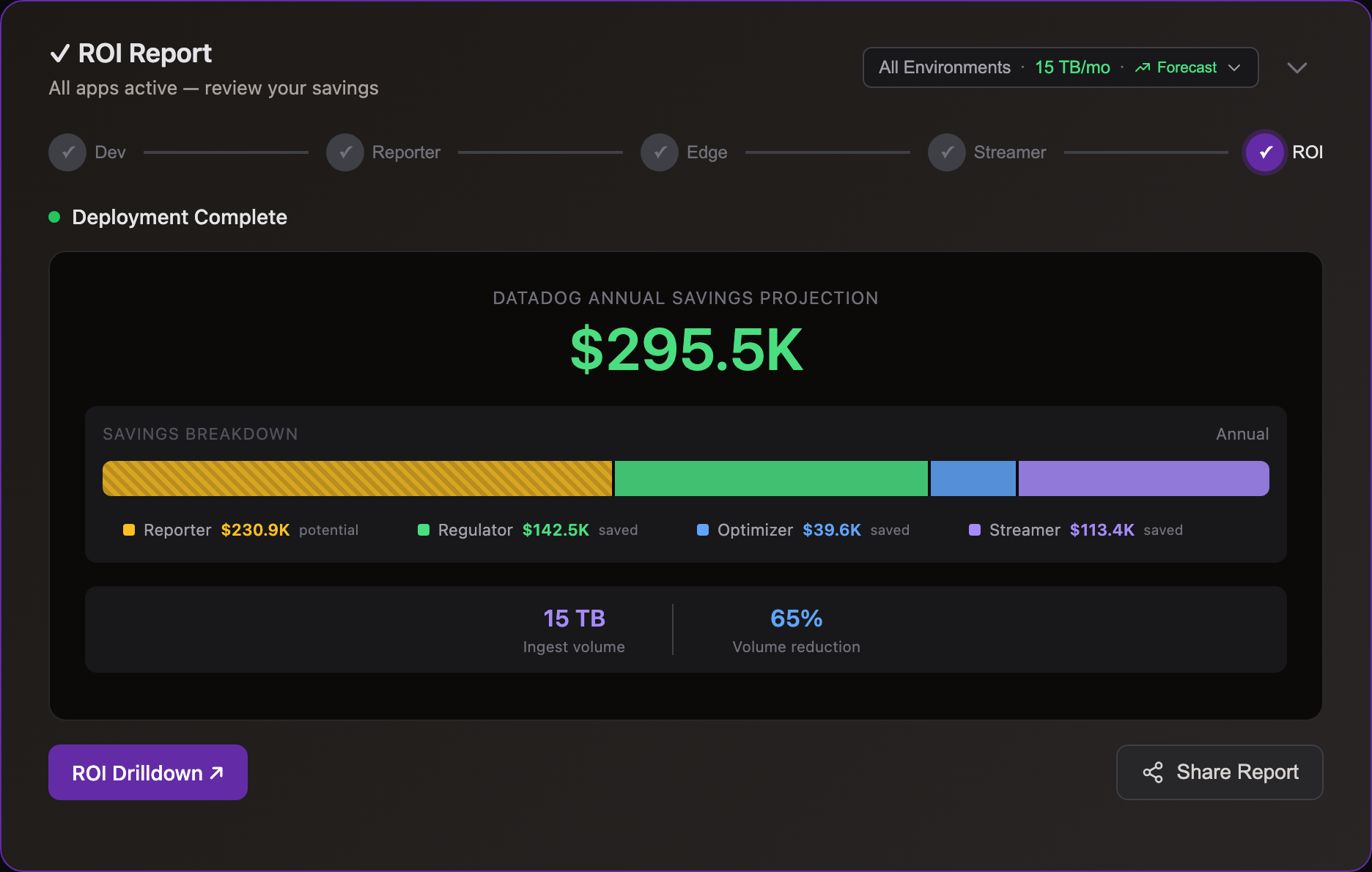
Dev
Preview savings

Datadog
Pinpoint waste
Edge
Optimize at source
Storage
Ingest on-demand

Simple Pricing
One question: How many nodes run log collection?
| Tier | Nodes | Annual Price |
|---|---|---|
| Starter | up to 50 | $15,000 |
| Growth | up to 300 | $35,000 |
| Business | up to 750 | $65,000 |
| Enterprise | up to 1,500 | $105,000 |
| Enterprise+ | 1,500+ | Contact us |
All tiers include unlimited log volume, all products, and all features. See all tiers →
Datadog Integration
Uses Datadog's native log and metric APIs.
Zero changes to pipelines, dashboards, or alerts
Zero Changes
Via Regulator and Streamer
Full Compatibility
Cut Flex & Archives
Frequently Asked Questions
Getting Started
- Dev — Run on your Datadog log files locally. One-line install, results in minutes. No account, no credit card.
- Cloud Reporter — Connect to your Datadog account via API. See which event types cost the most — no agent changes.
- Edge apps — Deploy optimizer and regulator via Helm chart alongside your forwarder. ~30 min setup.
- Storage Streamer — Route events to S3, stream selected data to Datadog on-demand.
Each step is independent — start with Dev to see your reduction ratio, then move to production when ready.
No. Your Datadog organization, Log Pipelines, dashboards, alerts, and saved views all continue working exactly as before. Edge Regulator sends events to Datadog in standard log format. Storage Streamer expands events from S3 back to standard format before streaming to Datadog. Cloud Reporter reads from Datadog's API (read-only). Edge Optimizer output goes to S3 in compact form — it does not send to Datadog directly.
Yes. Log10x publishes cost insight metrics directly to Datadog's time-series API — volume and bytes per event type, tagged by symbol identity. You see exactly which log patterns are consuming your ingestion budget on native Datadog dashboards.
This includes regulation visibility: when Edge Regulator caps noisy events, the metrics show what passed vs. what was filtered — so you monitor cost control without leaving Datadog.
Yes. Deploy the 10x Engine as a Lambda container image that subscribes to CloudWatch Log Groups via subscription filter — a drop-in replacement for the Datadog Forwarder Lambda.
CloudWatch delivers batched events to the 10x Lambda, which processes them through the same edge apps (Reporter, Regulator, Optimizer). Regulated events ship directly to the Datadog Logs API. The full optimized stream also writes to S3 via Kinesis Firehose — a dual-write that ensures complete retention for on-demand querying via Storage Streamer.
Billing: Each concurrent Lambda invocation counts as one node, same as edge forwarder pods. Your tier is based on P90 baseline concurrency over 30 days.
All 10x apps deploy in your infrastructure — no data leaves your network. Most teams adopt in three steps:
-
Cloud Reporter — samples your Datadog account API to pinpoint which services and source types cost the most. Runs as a Helm CronJobCloud Reporter — Helm CronJob:
log10xLicense: "YOUR-LICENSE-KEY"

jobs:
  - name: reporter-job
    runtimeName: my-cloud-reporter
    schedule: "*/10 * * * *"
    args:
      - "@apps/cloud/reporter"
Full deploy guide → in your cluster. -
Edge Optimizer — losslessly compacts logs at the source before they ship to Datadog. Add a tenx blockEdge Optimizer — Helm values:
tenx:
  enabled: true
  apiKey: "YOUR-LICENSE-KEY"
  kind: "optimize"
  runtimeName: my-edge-optimizer
Fluent Bit · Fluentd · OTel Collector · Logstash · Datadog AgentFull deploy guide → to your existing forwarder Helm values; CLI or Docker for VMs. -
Storage Streamer — stores logs in S3 and streams selected events back to Datadog on demand. Deploy via a Terraform moduleStorage Streamer — Terraform:
module "tenx_streamer" {
  source       = "log-10x/tenx-streamer/aws"
  tenx_api_key = var.tenx_api_key

  tenx_streamer_index_source_bucket_name = "my-app-logs"
}
Full deploy guide → that provisions S3 buckets, SQS queues, and IAM roles.
Cost & Savings
Yes. Storage Streamer indexes your logs in S3 and streams matching events to Datadog when you need them — for incidents, scheduled dashboards, compliance audits, or metric aggregation.
Most customers divert 80% of volume to S3. A 1 TB/day Datadog environment saves ~$700K/yr.
Datadog charges $2.50/GB for log ingestion with 30-day retention — the single biggest line item for most teams. A 10TB/month environment pays $25,000/month just to ingest and retain.
With Edge Optimizer (50%+ lossless reduction): that same 10TB drops to ~5TB ingested — $12,500/month. No data loss, all fields preserved.
With S3 streaming: route low-value logs to S3 at $0.023/GB and stream to Datadog only when you query — for incident investigation, dashboard population, compliance audits, or metric aggregation. See use cases for Datadog-specific savings examples.
Datadog pricing as of Feb 2026. $2.50/GB includes ingestion + 30-day indexed retention.
Two products, two paths:
- Edge Regulator → Datadog (direct): Caps noisy events and sends the rest to Datadog in standard log format. ERRORs always pass, DEBUG throttled first. Output goes directly to Datadog's Logs API. Learn more →
- Edge Optimizer → S3 (only): Losslessly compacts events 50%+ and writes to S3. Storage Streamer expands events back to standard format and streams them to Datadog on-demand.
Edge Optimizer output does not go to Datadog directly. For Datadog-bound logs, use Edge Regulator. Most customers start with the Regulator, then add Optimizer + S3 for maximum reduction.
Datadog (via Edge Regulator): Events that need real-time indexing — ERROR-level events, security alerts, SLO signals, and data powering active monitors and dashboards. Typically 10-30% of total volume.
S3 (via Edge Optimizer): Everything. Your complete dataset at $0.023/GB/month. When you need specific data in Datadog, Storage Streamer streams it on-demand — paying Datadog ingestion only on what you query.
S3 is the default destination for all log data. Datadog is for events that justify $2.50/GB real-time indexing.
Comparisons
The difference: Flex Logs makes it cheaper to store data you've already sent to Datadog. Storage Streamer means you never send it in the first place.
With Flex Logs, you still pay $2.50/GB to ingest and retain every event — Flex just stores it cheaper once it's there. With Storage Streamer, events go straight to your S3 at $0.023/GB. When you need data in Datadog, stream only the events that matter — or aggregate them into metrics at a fraction of ingestion cost.
Rehydration charges you ingestion a second time. You pay $2.50/GB to re-index data you already paid to ingest — and only data that was originally sent. Anything you filtered is gone.
Storage Streamer keeps 100% in your S3 and queries in-place. Stream only the events you need, or aggregate into metrics — no re-ingestion fees.
Observability Pipelines requires writing and maintaining VRL routing rules and regex for every log format your applications produce. The 10x Engine ships with symbol libraries for 150+ frameworks. For custom code, the compiler builds additional symbols from your repos in CI/CD. At runtime, events are matched to their structure via hash lookups — no regex, no pipelines to maintain.
Lossless vs lossy: OP reduces volume by dropping fields or sampling events — data is lost. Edge Optimizer losslessly compacts events 50%+ by encoding structure once and transmitting only values. Every field is preserved.
Tero uses Intel Hyperscan regex to identify “waste” patterns in log text at runtime — fast for filtering, but limited to what text analysis can match. Log10x compiles typed schemas from your source code, matching events via hash lookups — no regex at all.
For Datadog customers: Tero identifies and filters waste (40–70% reduction by dropping low-value events). Log10x compacts all events losslessly (50%+ reduction while retaining everything). Choose based on your data retention requirements.
Cut Your Log Costs
Sign up, connect your Datadog environment, and see savings.Works with Datadog Logs and Metrics.