
Cut CloudWatch
Ingestion By Half
Optimize at the edge to cut costs 50%.Stream from S3 on-demand to reach 80%+
Cut Ingestion Costs
Filter, regulate, and optimize events before they reach CloudWatch

Dev
Preview savings
CloudWatch
Pinpoint waste
Edge
Optimize at source
Storage
Ingest on-demand


CloudWatch Integration
Processes events before they reach CloudWatch via sidecar or Lambda.
Zero changes to queries, dashboards, or alarms
Zero Changes
Full Compatibility
AWS Compute
Frequently Asked Questions
Getting Started
- Dev — Run on your CloudWatch log files locally. One-line install, results in minutes. No account, no credit card.
- Cloud Reporter — Connect to your CloudWatch Log Groups via API. See which event types cost the most — no agent changes.
- Edge apps — Deploy optimizer and regulator via Helm chart alongside your forwarder. ~30 min setup.
- Storage Streamer — Route events to S3, stream selected data to CloudWatch on-demand.
Each step is independent — start with Dev to see your reduction ratio, then move to production when ready.
Yes. Log10x operates pre-ingestion — events that pass through arrive in standard CloudWatch format. Logs Insights queries, dashboards, metric filters, and alarms all work unchanged. Zero reconfiguration.
Events are losslessly compacted — no data is dropped or removed.
Yes. Log10x works with all AWS compute services that send logs to CloudWatch:
- ECS (including Fargate): Edge apps deploy as sidecar containers alongside your log forwarder
- EKS: DaemonSet deployment alongside Fluent Bit or OTel Collector
- EC2: Process-level deployment alongside your log forwarder
- Lambda: Deploy the 10x Engine as a Lambda container image that subscribes to CloudWatch Log Groups via subscription filter. Reports, regulates, or optimizes events before they reach CloudWatch
Edge optimization (Optimizer, Regulator) works best with open-source forwarders: Fluent Bit, Fluentd, or OpenTelemetry Collector. For CloudWatch Agent environments, use Cloud Reporter (agentless cost analysis via REST API) and Storage Streamer (S3-based optimization) — no agent change required.
For teams ready for edge optimization, Fluent Bit migration is straightforward: most clusters complete the switch in under an hour following our docs.
Cost & Savings
Yes. Storage Streamer indexes your logs in S3 and streams matching events to CloudWatch when you need them — for incidents, scheduled dashboards, compliance audits, or metric aggregation.
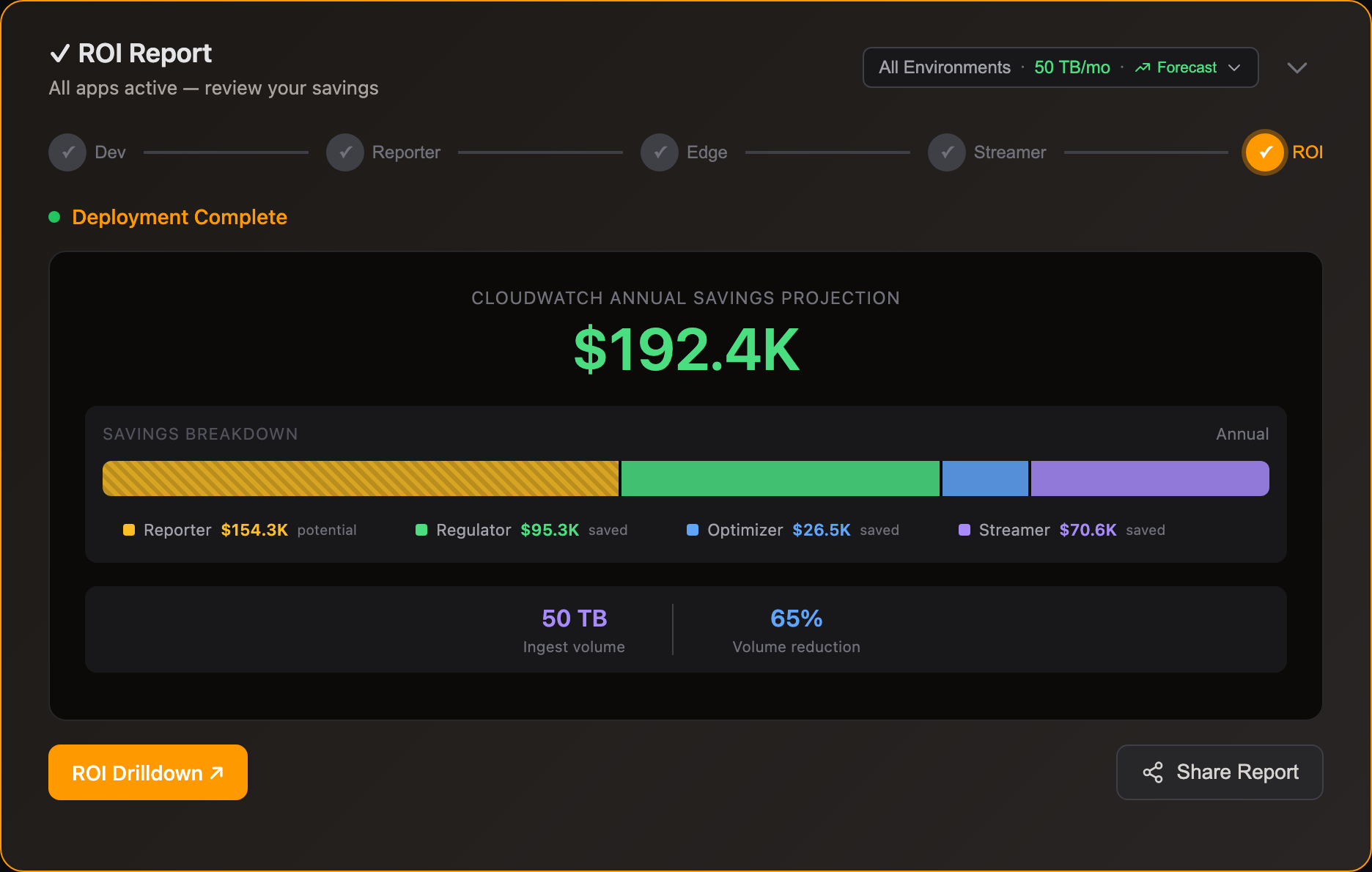
Most customers divert 80% of volume to S3. A 5 TB/day CloudWatch environment saves ~$680K/yr.
CloudWatch charges $0.50/GB for log ingestion (us-east-1) — the single biggest line item for most teams. A 10TB/month environment pays $5,000/month just to ingest.
With Edge Optimizer (50-60% lossless reduction): that same 10TB drops to ~4TB ingested — $2,000/month. No data loss, all fields preserved.
With S3 streaming: route low-value logs to S3 at $0.023/GB and stream to CloudWatch only when you query — for incident investigation, dashboard population, compliance audits, or metric aggregation. See use cases for savings examples per vendor.
CloudWatch pricing as of Jan 2026
Yes. At $0.50/GB, a single noisy deployment can add thousands to your bill in hours. Edge Regulator tracks actual cost per event type (bytes × $/GB) and enforces per-type budgets automatically — severity-aware, so ERRORs are kept while DEBUG is throttled first.
For K8s environments, per-app budgets prevent individual services from bypassing limits by scaling pods. For environment-wide control, GitOps policies push cost thresholds to all regulators from a central config.
Comparisons
S3 Export moves logs to S3 after ingestion — you still pay the full $0.50/GB CloudWatch ingestion fee. Log10x Edge Optimizer reduces volume before ingestion, cutting that fee by 50%+.
S3 Export also produces raw files with no index. Storage Streamer indexes files at upload, so queries skip 99%+ of files and return results in seconds — no Athena or Glue required.
Metric Filters extract numeric values from logs after ingestion and publish them as CloudWatch Metrics. They reduce the need to query raw logs, but the logs are still ingested at full cost.
Log10x works pre-ingestion: Edge Optimizer compacts events before they reach CloudWatch, and Edge Regulator caps noisy event types. You can use Metric Filters on the reduced volume that does get ingested — the two approaches stack.
Vended Logs (VPC Flow Logs, Route 53, WAF, etc.) deliver directly to S3 or Firehose at reduced rates, bypassing CloudWatch ingestion. For these log types, sending to S3 and querying via Storage Streamer is the most cost-effective path.
Log10x focuses on the logs you do send to CloudWatch — application logs, container logs, and custom log groups where the $0.50/GB ingestion fee applies. Edge Optimizer reduces that volume before ingestion; Storage Streamer makes the S3-stored vended logs queryable.
Cut Your Log Costs
Sign up, connect your AWS environment, and see savings.Works with ECS, EKS, EC2, and Lambda